
Can I use sieve mail filtering?
Use of Sieve filters and their compatibility
Sieve filters consist of multiple filter files, each containing different rule sets. In principle, these filter files can be activated or deactivated as desired. This way you can switch between a “standard filter” and a “vacation filter”, for example.
In practice, however, many – if not all – Sieve implementations only support one specific filter name – their own. Most of these implementations do not allow a filter file to be loaded under a different name. For example, such a filter file might be called “Open-Xchange.” If tool XY exclusively looks for the filter file XY, it will not recognize “Open-Xchange.” Conversely, if XY saves the file under its own name, OX will not be able to identify and display it. So if you upload and activate a filter file named XY with XY, OX will not recognize and process it – and vice versa.
There are good reasons for these restrictions. Many Sieve editors are very strict about their syntax and want to interpret only “their” specific syntax. When Sieve files from different tools are combined, problems often arise. Rules may not be read or processed correctly, or they may be lost when edited with other software. For this reason, many tools limit themselves to reading and writing only their own filter files to avoid such conflicts. In most cases, users only use one tool for editing and do not mix different tools, so these restrictions are usually not a problem.
In summary: you can easily create Sieve filters for us using external tools. However, it is not advisable to edit them simultaneously in OX – and vice versa. For our Sieve system, it does not matter which tool created the rule sets.
No support for individual Sieve rules
mailbox provides standard access for Sieve rules and clients. This allows you to create your own server-side rules for mail filtering, for example to filter mail directly on the server and redirect it into IMAP folders. Details about the syntax and capabilities of Sieve can be found in articles on Wikipedia or in magazines such as Linux-Magazin. mailbox cannot provide support for your individual filter configurations.
Creating filter rules in mailbox
You can access the settings via the gear icon in the top right corner of mailbox Office. Select the entry:
Mail | Rules | “Add new rule”

Figure 1: Via Mail | Rules you can create new rules for automatic filtering.
Sieve filters and mail programs
Many mail programs provide special plugins that allow users to create Sieve rules directly. mailbox uses the Managesieve protocol and the standard ports 2000 and 4190 (Figure 2 shows the implementation in KDE Kontact on Linux).
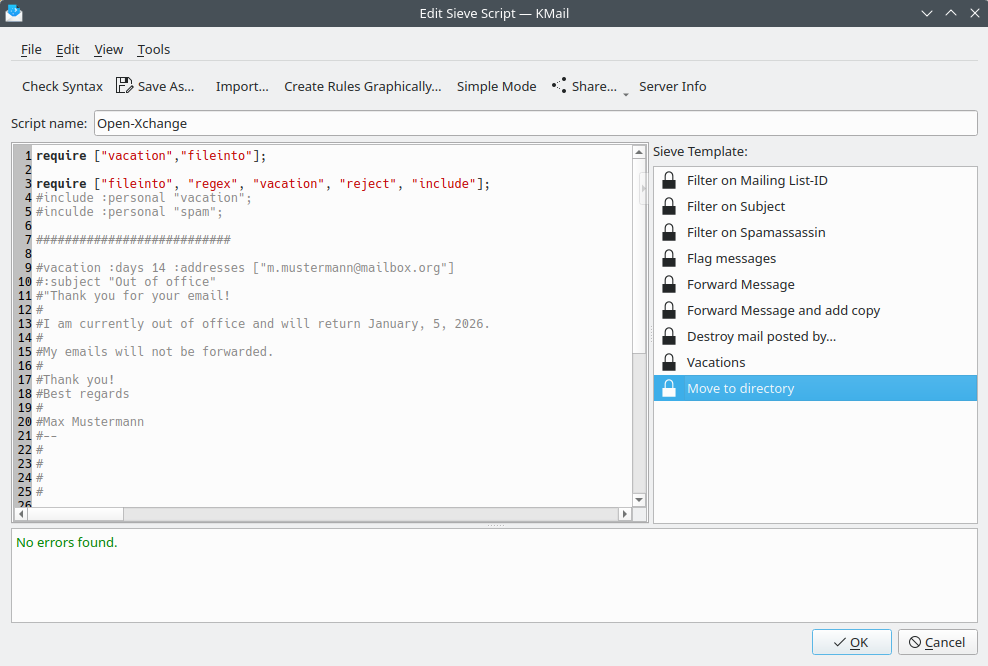
Figure 2: Direct editing of Sieve filter rules with KDE Kontact (KMail) on Linux.
Limitation: not applicable to external mail accounts
Sieve rules only apply to the inbox – not to external mailboxes. This applies both to your individual rules and to spam and virus filters.
The reason is that Sieve filters only apply to mail that is delivered “normally” to your mailbox address via SMTP. Mail from linked external mailboxes is not delivered into your mailbox but merely displayed in your account – similar to working with a local mail program via IMAP.
To apply your filters to these messages as well, you would need to either forward them from your external account to your mailbox account or retrieve the mail from there using POP3.
Troubleshooting
If your filter rules are not working, there may be several reasons.
If the outcome of the configured filters differs from your expectation, it is usually because the filters were misconfigured or because multiple filters are interfering with each other.
We cannot provide support for the individual configuration of your filters.
Disable all filters and then reactivate them one by one to identify where the error occurs.


