
Troubleshooting problems with mailbox
Are you unable to use your mailbox as usual, is the webmail client not loading properly, or are you unable to send or receive emails as expected? Many problems can be narrowed down or resolved yourself in just a few simple steps.
In this article, we will show you what you can check yourself and what information will help our Support team with their further analysis. Please follow the steps below in order. After each step, check whether the problem persists.
Checking for common sources of error
Step 1: Check whether there is a general service disruption
Sometimes the cause is not your device or your internet connection, but a service provided by mailbox.
Check whether any current disruptions or restrictions are reported on the webmail login page or in the User Forum. If there is a disruption, please wait for it to be resolved before trying any further steps.
Step 2: Reload mailbox or restart your browser
Reload the mailbox webmail service. If that does not help, close your browser completely and reopen it.
Then check whether the problem persists.
Step 3: Clear your cache and cookies
Your browser stores data from websites you have visited so that they can load more quickly the next time you visit them. Outdated or corrupted stored data can occasionally cause problems.
Clear your browser’s cache and cookies, then open mailbox again. Please note that you may need to log in again as a result.
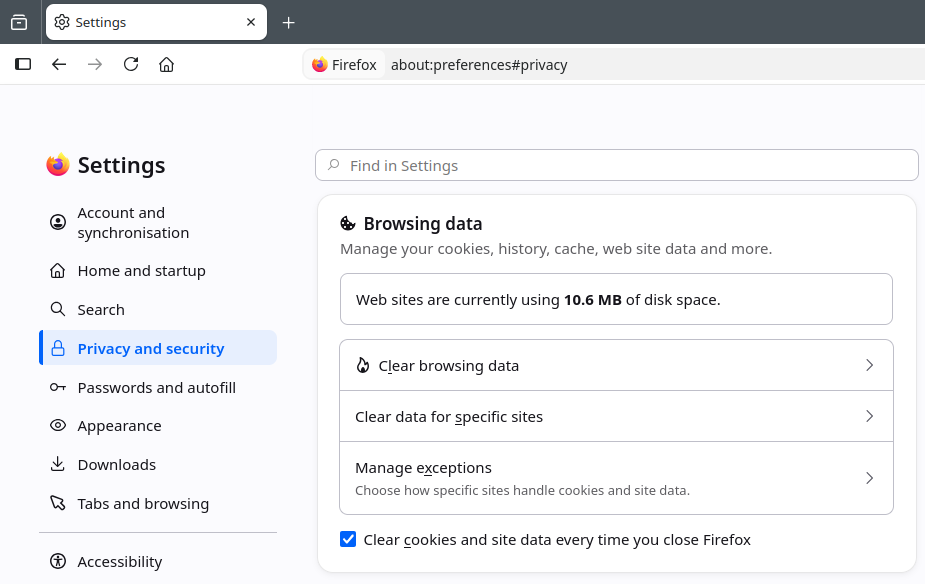
Clearing browser data in Firefox settings
If you have forgotten your password, you can reset it yourself on the login page by clicking on Forgot password? The Forgotten password page will guide you through the process step by step. To do this, you must have set up an alternative verification method in your mailbox account (see the article Forgotten password).
Step 4: Try using a private browser window
Open the mailbox webmail client in a private window (incognito window) in your browser. Check whether the problem also occurs there.
If mailbox works in the private window, the cause may be stored data or browser extensions. In this case, try disabling your extensions or check the stored website data for mailbox.
You can find more information on configuring browser extensions in this article: Browser extensions
Step 5: Use a different browser
Try using mailbox with a different, up-to-date, compatible browser.
You can find an overview of supported browsers and email programmes here: Which programmes are compatible with mailbox?
Step 6: Try a different device
If possible, open mailbox on a different device, for example on a smartphone rather than a laptop or desktop PC.
If the problem only occurs on one device, the cause may lie in its settings, software or browser.
Step 7: Try a different internet connection
Check whether the problem also occurs when using a different internet connection. For example, you can compare Wi-Fi and mobile data.
If the problem only occurs on a specific network, the cause may be related to the network connection or its settings.
If the error still occurs after checking all the points above, our Support team will be happy to help.
How do I contact mailbox Support?
If you have been unable to resolve the problem using the steps above, please contact our Support team:
- by email to helpdesk@mailbox.org
- via a support ticket at https://support.mailbox.org
Please describe the problem as specifically as possible and include the results of any tests you have carried out so far. Please include the points listed below in your enquiry. This will enable us to investigate the cause more effectively and assist you more quickly.
What information does mailbox Support need?
The more precisely you describe the problem, the easier it will be for us to pinpoint the cause.
Please include the following information in your enquiry, along with screenshots of any error messages and your current settings:
-
Description of the problem: What is not working as expected? Does the problem only affect a specific feature, or is mailbox completely inaccessible? What error message is displayed? What were you doing immediately before this happened?
-
Timing: Since when has the problem been occurring? Is it a persistent issue or does it occur only occasionally?
-
Operating system: Which operating system are you using and which version is installed (e.g. Windows, macOS, Linux, Android or iOS)?
-
Browser: Which browser are you using and which version is installed? Have you installed any plug-ins or add-ons?
-
Email programme: If you are using an external email programme such as Thunderbird, Outlook or Apple Mail, please state the name and version.
-
Tests carried out so far: Have you already tried a different browser, an incognito browser window, a different device or a different internet connection? What was the result?
-
Affected service: Can you log in to the mailbox webmail client? Can you send and receive emails there, or does the problem occur there as well?
You do not need to be able to provide all the details. Simply let us know the information you have available that is relevant to your problem.


