
Explore mailbox with a free test account
The free 30-day trial at mailbox
To help you get to know mailbox without any commitment, all new customers automatically receive a free 30-day trial account. During this period, all menu items, settings, and services are available.
For security reasons, certain restrictions apply during the trial phase to prevent misuse by spammers, fraudsters, or for illegal activity.
Why are there restrictions?
Unfortunately, trial accounts are sometimes misused — for example:
- to register accounts with third-party services (e.g. social media platforms, payment services like PayPal),
- to send spam,
- or for illegal file sharing.
To protect the good reputation of mailbox with other email providers and ensure reliable delivery of your messages, responsible handling of new accounts is essential.
Restrictions during the trial phase
| Feature | Restriction during trial phase |
|---|---|
| Sending email | Max. 10 emails per day to other mailbox users |
| Receiving email | Restricted receipt of emails from certain external senders, e.g. social media, payment services, verification codes |
| Email storage | Limited to 100 MB |
| Cloud storage | Limited to 10 MB |
How to lift the restrictions
As soon as we receive a payment for your account, all of the restrictions mentioned above will be fully removed.
You can make a payment in the mailbox Suite at any time under All Settings > Contract and payment.
What happens after the trial phase ends?
Trial accounts are automatically deleted after 30 days unless a payment has been received. No separate cancellation is required.
The same blocking periods apply to email addresses associated with trial accounts as to accounts that were previously paid for and then cancelled. You can find more information about blocking periods in the article When is a deleted address available again?.
How do I cancel during the trial phase?
If you no longer wish to test mailbox, you can simply wait until the trial phase has expired. However, if you would like to delete your account with immediate effect, you can cancel your subscription directly via the cancellation form:
- Go to All settings > Contract and payment in the mailbox Suite.
- Open the Contract section.
- Click the Cancel contract button.
- Fill in the cancellation form.
- Under End of contract, select the option Requested date and enter today’s date.
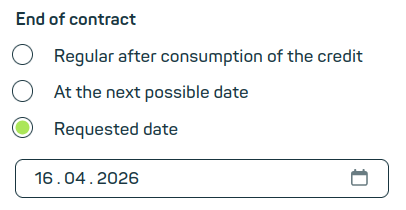
Enter the desired date for the end of the contract - Confirm by clicking on Cancel now.
Your cancellation has been submitted. Please note that it may take a moment for us to process the cancellation and delete your account.


