
Direct debit payment
At mailbox, you can conveniently pay using the direct debit option. This method – also known as a SEPA direct debit mandate – allows payments to be automatically withdrawn from your bank account without requiring any manual action. This will prevent your account from being blocked due to a missed payment.
Availability of the SEPA direct debit option
The SEPA direct debit option is available under the following conditions:
- You have previously used another payment method, e.g. bank transfer or PayPal.
- You have a bank account in Europe that participates in the SEPA direct debit procedure.
Setting up direct debit
Only the annual interval is available as payment interval for direct debit. The total amount will be charged once per year.
-
Sign in to your mailbox account.
-
In the mailbox Suite, click the gear icon and then All settings > Contract and payment > Payment.
-
Activate the SEPA direct debit option.
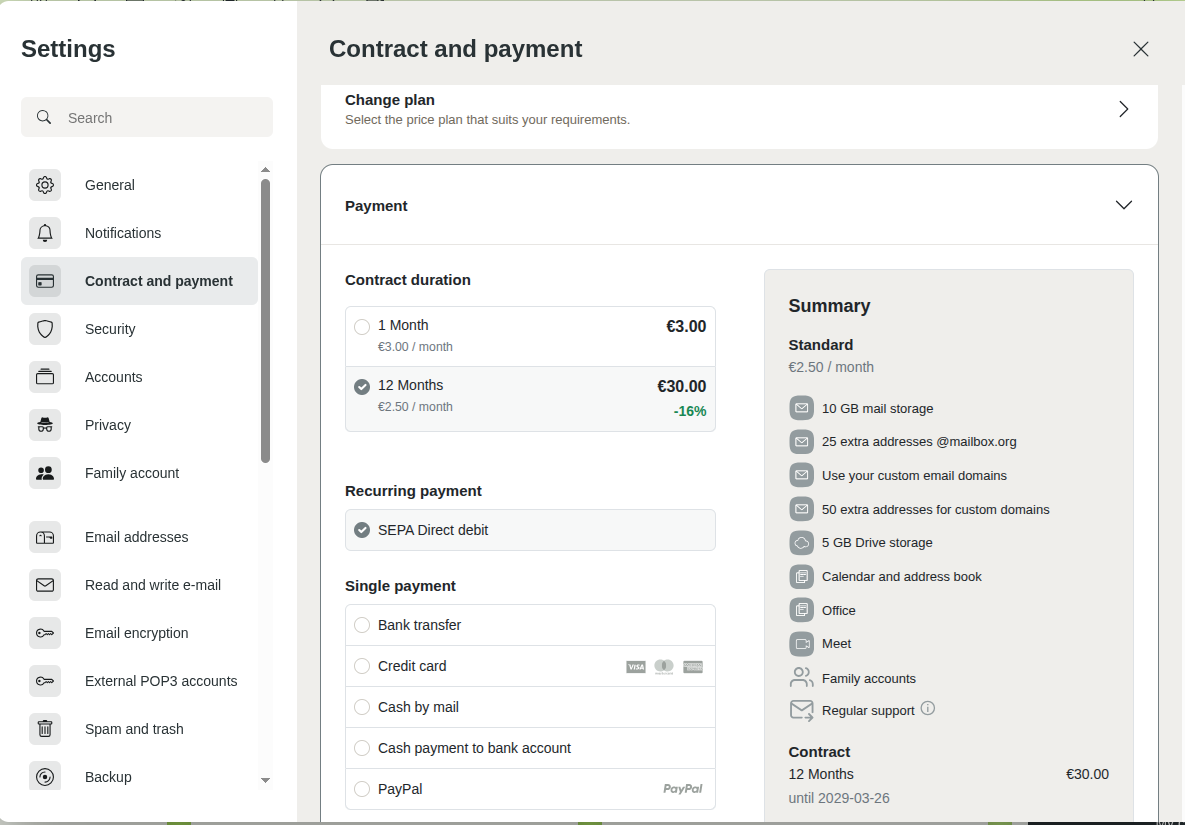
Payment section with the direct debit option -
Confirm the terms and conditions, and the waiver of the right of withdrawal.
-
Click Order with payment obligation.
-
Enter your bank details.
Ensure that all details are correct, as incorrect information may result in error messages or chargebacks.
-
Agree to the direct debit agreement by checking the box. 8. Click Save direct debit authorization.
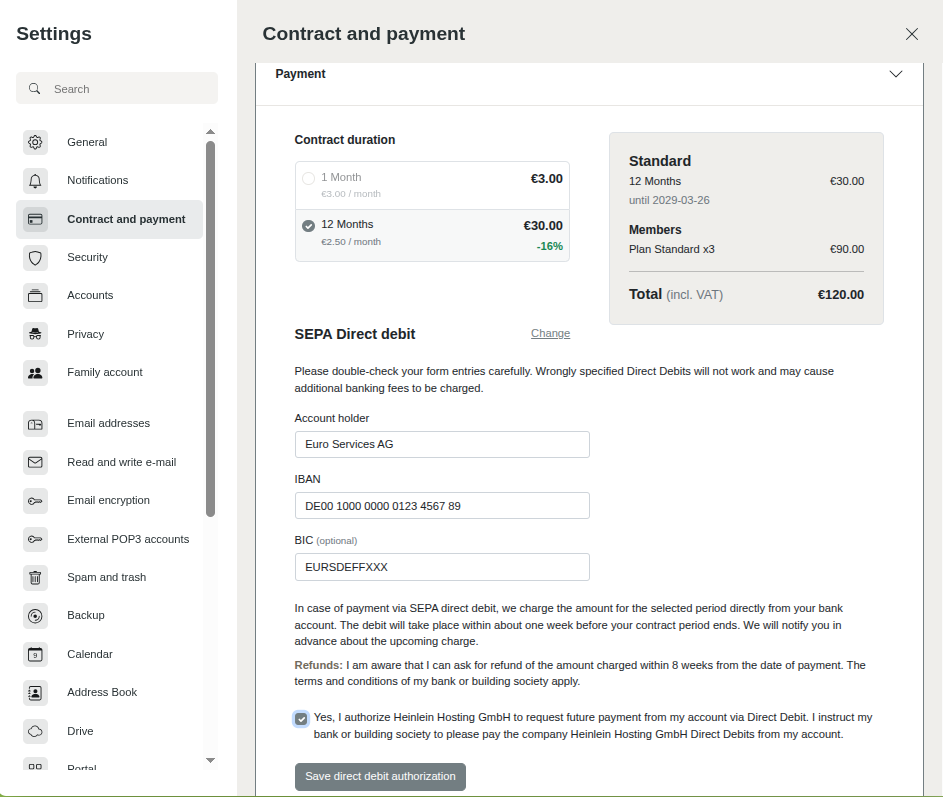
Confirmation of the direct debit authorisation
Once the setup has been completed successfully, a confirmation message will be displayed. If any data is entered incorrectly, an error message will appear so you can correct it.
You can delete your direct debit authorisation at any time by clicking Delete direct debit authorization.
After setup
Once the direct debit authorisation has been saved, you will automatically receive an invoice by email. The payment will then be withdrawn from your specified bank account.
In addition, mailbox will send you an email reminder 14 and 7 days before the next due date to alert you to the upcoming direct debit. This way, you can ensure there are sufficient funds in your bank account.
You can deactivate the direct debit option at any time if you prefer to use another payment method. We recommend that you do this no later than 14 days before your next payment is due.
Returned direct debits
If a direct debit is unsuccessful, a chargeback will be triggered automatically. In such a case, please contact the Support team immediately to avoid possible suspension of your account. Common causes include incorrect bank details or insufficient account balance.
Please make sure that your bank account supports SEPA direct debits and that all required details are entered correctly. If you have any questions or need assistance, please contact the Support team at mailbox.
Frequentely asked questions
When will the payment be taken?
The direct debit is always triggered 7 days before the end of your contract term. mailbox will send you an email reminder 14 and 7 days before the next due date to alert you to the upcoming direct debit.
When will my contract be renewed?
Your contract will be automatically renewed once we have received your payment.
Where do I enter my bank details?
In the mailbox Suite, navigate to All settings > Contract and payment > Payment and confirm the terms and conditions, and the waiver of the right of withdrawal. Click Order with payment obligation. Then, you can enter your bank details and save the direct debit authorisation.
Can I pay for my Family account by direct debit?
You can also use direct debit within a Family account. This is particularly useful for administrators of a Family account with joint billing, or for all members of a Family account with separate billing.
My contract has expired – can I pay by direct debit?
If your contract has already expired, you will first need to renew it by making a manual payment. SEPA direct debit authorisations set up retrospectively cannot be used for this purpose. Once your contract has been renewed, you can set up SEPA direct debit for future renewals.


