
Sharing calendars
Sharing calendars as iCal link
In mailbox, you can easily share your calendars as an iCal link to make them accessible to others. The recipient can view the calendar but cannot edit it.
Procedure
-
Log in to your mailbox account.
-
Go to the Calendar section.
-
In the column on the left, click on the calendar you want to share.
-
Click the three-dot menu next to the calendar name and select Share / Permissions.
-
In the share dialog, select the option Anyone with the public link and invited people.
-
Copy the public link by clicking Copy link.
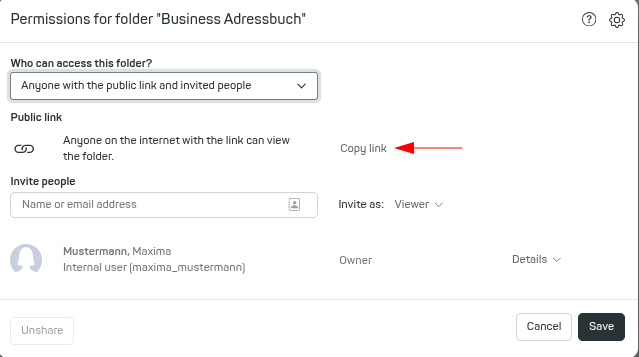
Creating a public linkExample public link:
https://app-share.mailbox.org/appsuite/api/share/03627a6501b88c4f354d908c47eba730f72a0c98f156/1/2/Y2FsOi8vMC8zMQ -
To subscribe to this link as an iCal calendar (e.g., in Thunderbird), add
?ical=trueto the end of the URL.
Resulting iCal link:
https://app-share.mailbox.org/appsuite/api/share/03627a6501b88c4f354d908c47eba730f72a0c98f156/1/2/Y2FsOi8vMC8zMQ?ical=true
This allows the recipient to subscribe to the calendar as an iCal file.
Note
- The recipient will have read-only access to your calendar.
- Changes to the calendar via the shared link are not possible.
- For further technical details, please refer to the official Open-Xchange documentation.


